 Engineering & Software
Bring the field, the network and SAP together on one platform for electricity distribution
SevkAI is a locally developed workforce management (WFM) platform for managing fault repair, meter, planned maintenance and investment work, field crews and network assets on the same live data. A job opened at the dispatch desk goes to the mobile app in the field, and every step taken in the field flows back to SAP.
Product catalogue: English (PDF, 2.7 MB) · Türkçe (PDF, 2.6 MB)
Developed with TREDAŞ under EMRA's local software R&D project call
SevkAI is being developed by Fizibil Engineering & Software within a project carried out with Trakya Elektrik Dağıtım A.Ş. (TREDAŞ) under the local software R&D project call of Türkiye's Energy Market Regulatory Authority (EMRA / EPDK).
Project status: nearing completion


Minutes lost between screens end up in SAIDI
In distribution companies, the fault report sits in the call centre, the network in GIS, the work order in SAP, the crew on the phone and the meter data in the AMR system (OSOS). While the operator switches between these systems, the customer waits without power.
- One live picture: open work orders, crew locations, customers without power and network assets on the same screen.
- No manual code entry: transformers, feeders and functional locations are picked without errors from selectors fed by GIS and SAP.
- Write-back to SAP: status changes, damage reports, material consumption and sealing from the field are sent to SAP; no command is lost.
- Regulation built in: EMRA 24/48-hour SLAs, the 48-hour outage notice and the SAIDI/SAIFI impact are tracked automatically.
From fault report to power restored
Report and detection
Calls from the 186 power-outage line and CRM, “last gasp” signals from smart meters (OSOS) and SCADA alarms are clustered on the GIS topology to locate the likely fault point.
Smart dispatch
“Smart Auto-Assign” proposes a crew based on proximity, MV/LV competence and workload. A rejected job is reassigned instantly.
Safe field work
No job can start before the OHS checklist is confirmed, and work in an energised cell cannot start without LOTO approval. Steps are evidenced with GPS and photos.
Close-out and reporting
Restoration time, damage codes and materials used are written to SAP; the SAIDI/SAIFI impact and SLA compliance appear on the dashboard.
A focused desk for every unit
All modules share the same data model, the same corporate sign-on and the same SAP integration layer.
Operations and Control Centre Portal
Dispatchers · network controllers · shift supervisors · warehouse managers
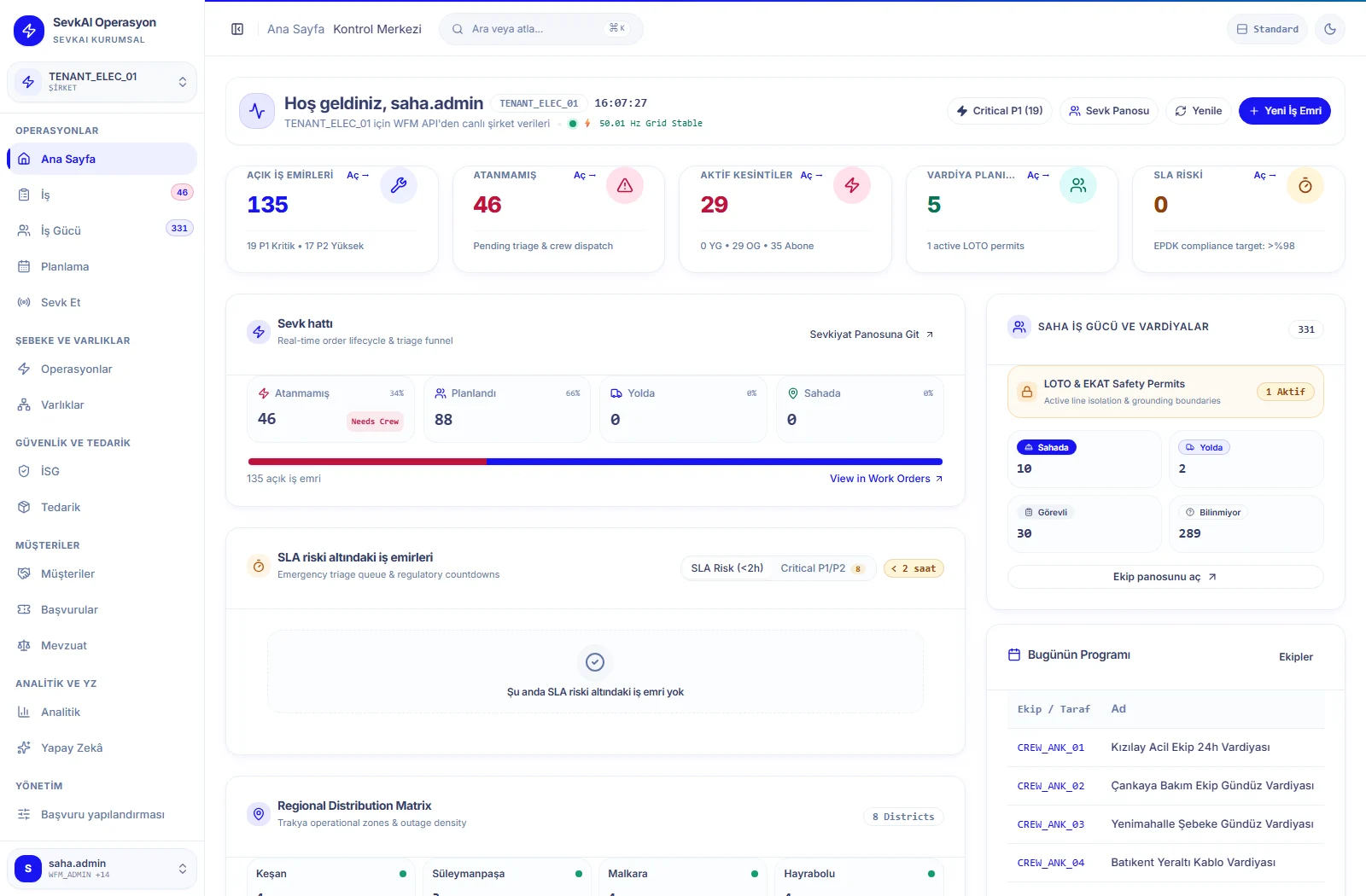
- Active work orders, urgent outages, tasks at SLA risk and crew distribution on a single command screen.
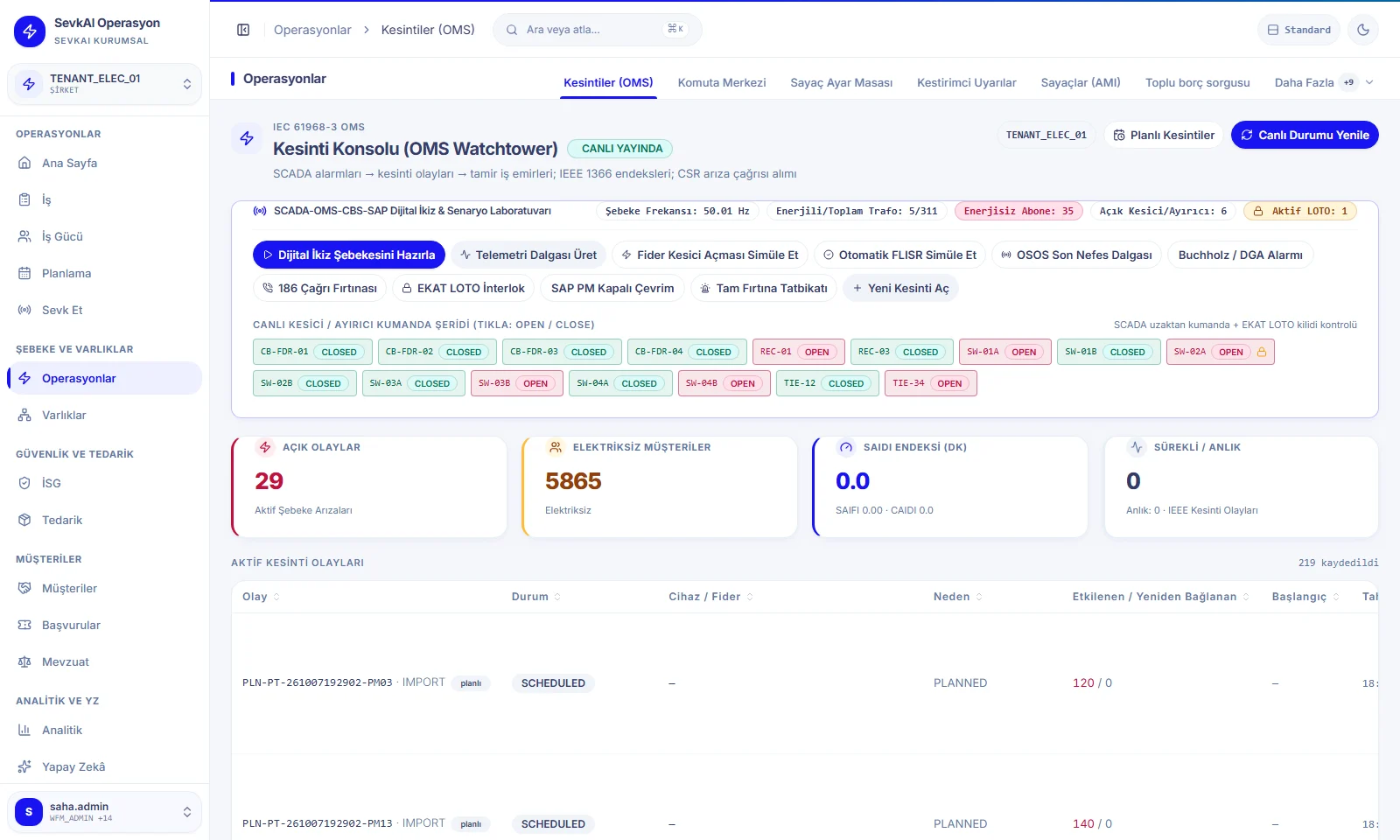
- Outage management (OMS): affected MV/LV feeders, customer counts and the IEEE 1366 SAIDI/SAIFI impact calculated live.
- Two-stage LOTO (lockout/tagout) permit: work in an energised cell is blocked until approval is complete.
- Materials and warehouse: SAP MM stock and crew vehicle stock; shifts and HV/live-work competences on the workforce screen.
Fault Repair Desk
Fault repair dispatchers · regional dispatchers · OMS/FLISR engineers
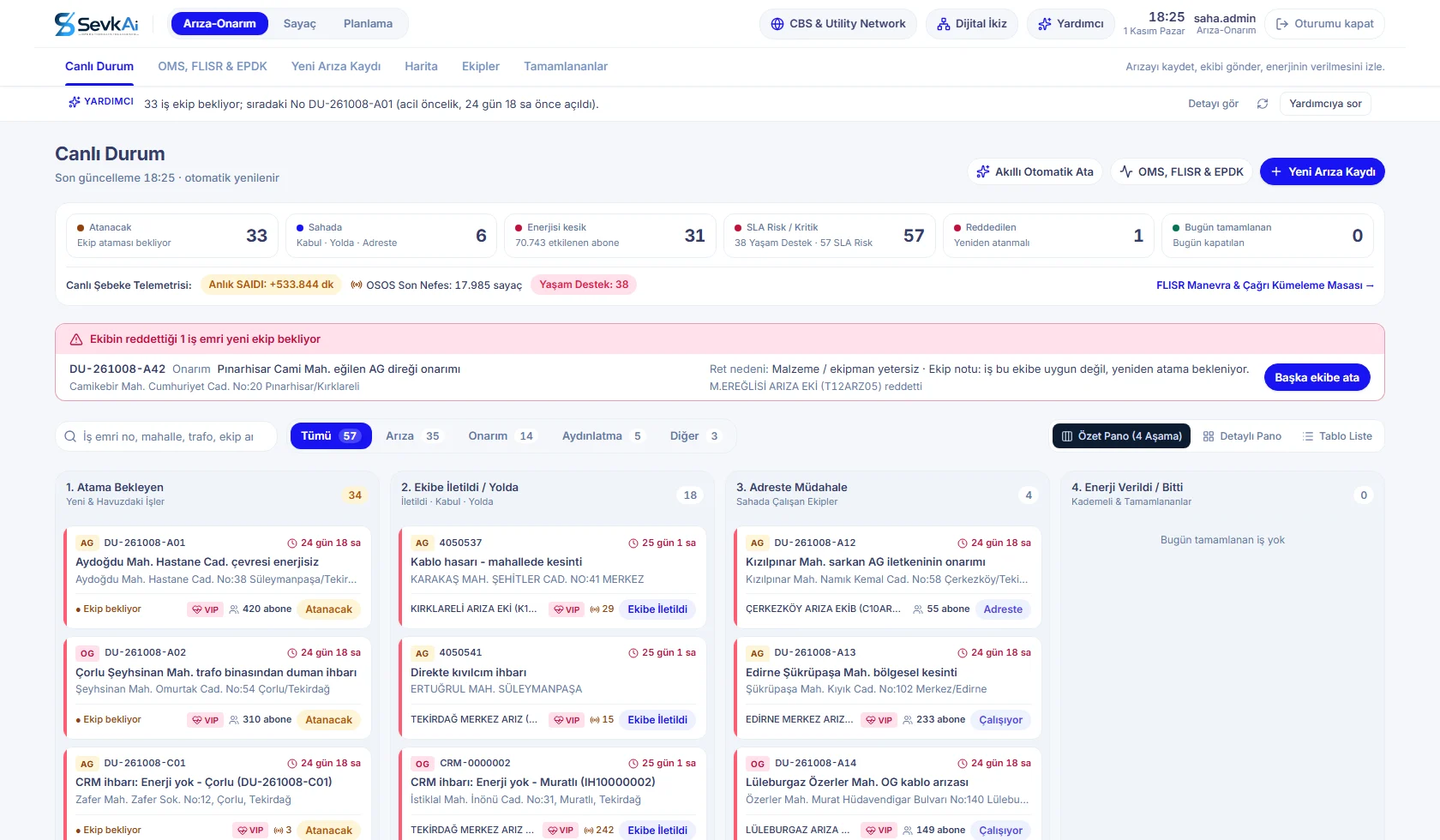
- Four-stage live board: To assign → En route → On site → Power restored.
- Top strip with counts of jobs to assign, in the field, customers without power, SLA risk / life support and rejected jobs.
- Smart meter “last gasp” signals and 186 calls are clustered; FLISR switching suggestions restore supply to healthy feeder sections.
- When a new fault is logged, the transformer/feeder is selected from live GIS and SAP selectors and linked to an open OMS outage.
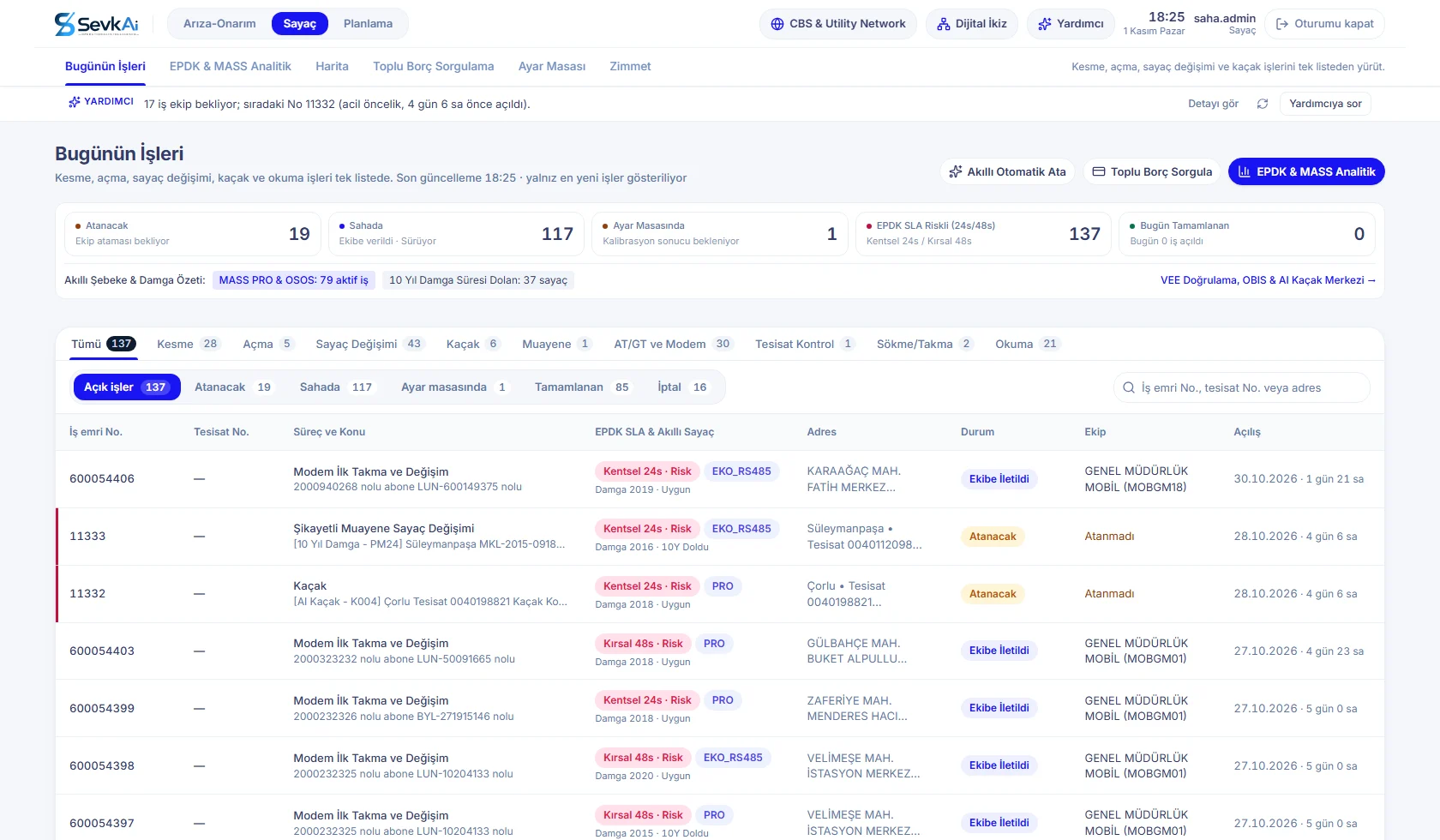
Meter Operations Desk
Meter operations specialists · disconnect/reconnect operators · calibration desk · custody officers
- Disconnection for debt, reconnection, replacement of meters with expired stamps, theft detection, complaint inspections and modem jobs.
- EMRA SLA times of 24 hours (urban) and 48 hours (rural) are tracked with colour codes.
- “Bulk Debt Check”: disconnection orders for customers whose debt has been settled in SAP IS-U are closed before they reach the crew.
- Calibration desk, automatic certificate numbers and each crew's meter/seal custody balance.
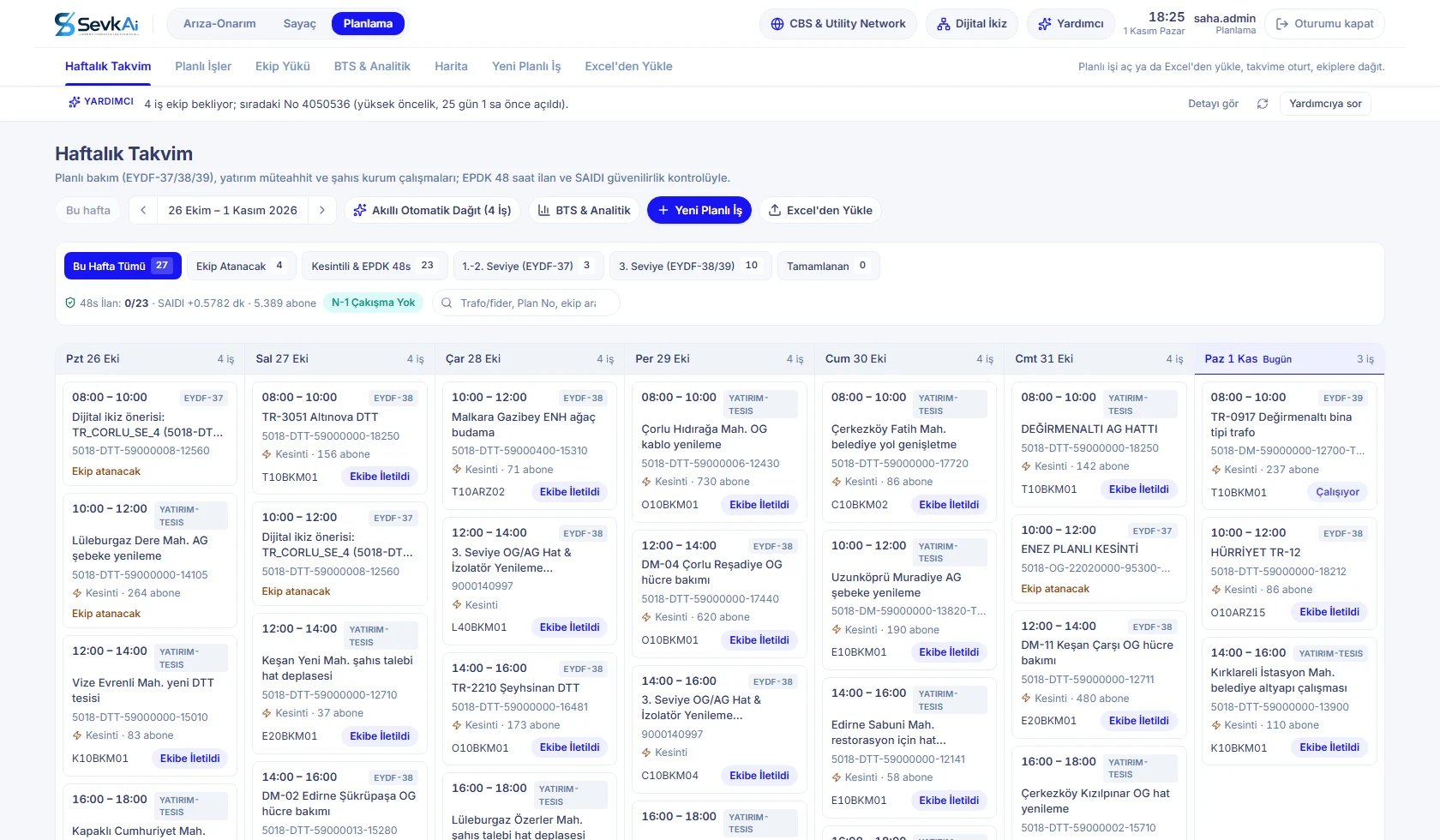
Planning and Investment Desk
Maintenance planning engineers · investment and facilities specialists · EMRA notification officers
- EYDF-37 / 38 / 39 planned maintenance under EMRA's maintenance regulation on a weekly calendar.
- For jobs requiring an outage, the 48-hour advance notice rule and the estimated SAIDI impact are checked automatically, with N-1 conflict checks.
- Hierarchical asset selection from the SAP functional location tree; bulk upload of annual plans from Excel.
- “Smart Auto-Distribute” assigns jobs without a crew to suitable maintenance crews.
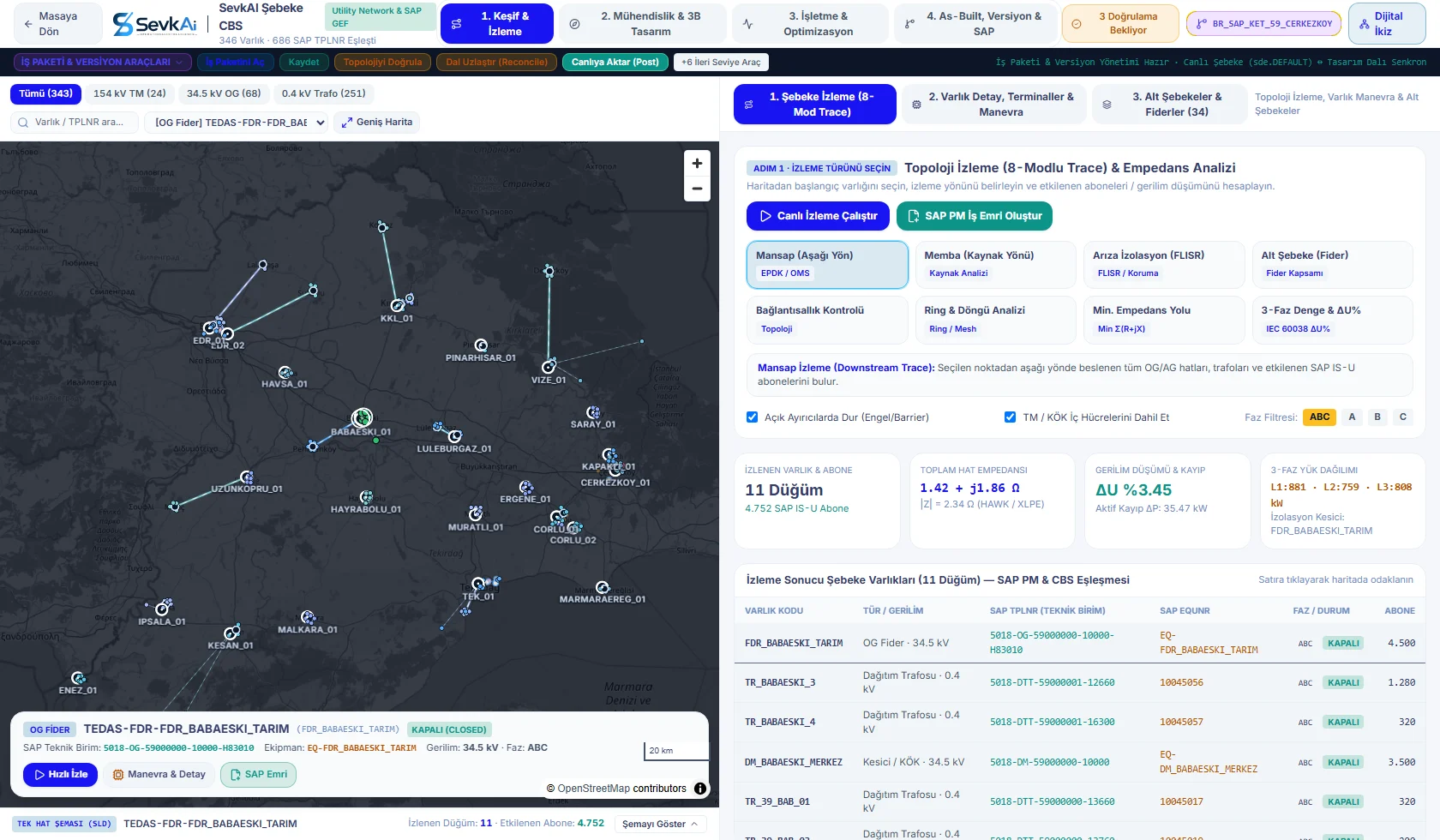
Network GIS & Utility Network
GIS specialists · network operations engineers · protection and switching engineers
- 8-mode topology tracing compatible with Esri Utility Network and SAP GEF: downstream, upstream, fault isolation, ring, impedance path, phase balance.
- Trace results show the number of affected customers, line impedance, voltage drop (ΔU%) and 3-phase load distribution.
- Branch versioning: design, validation and as-built transfer without disturbing the live network.
- Single-line diagram (SLD) with the SAP functional location / equipment for each node; one-click SAP PM work orders.
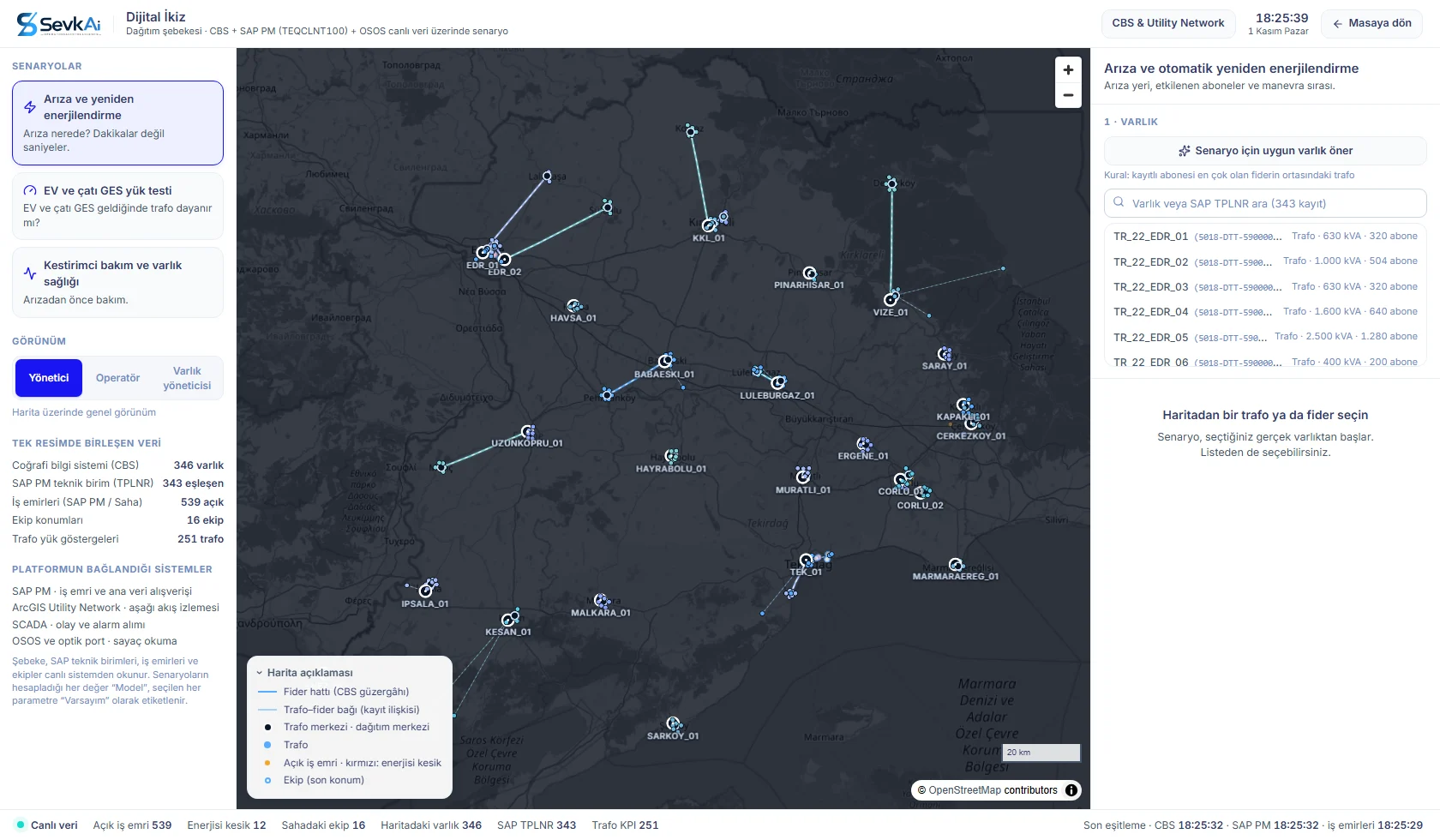
Network Digital Twin
Network planning managers · operations managers · asset managers
- GIS, SAP PM functional locations, SCADA alarms, smart meter load profiles and open work orders in one live model.
- Faults and re-energisation: affected customers, alternative supply and switching sequence within seconds.
- EV and rooftop PV load testing: transformer hosting capacity, with a network reinforcement work order in SAP where needed.
- Predictive maintenance: maintenance priority by remaining useful life and hot-spot temperature. Live data and model assumptions are labelled separately on every screen.
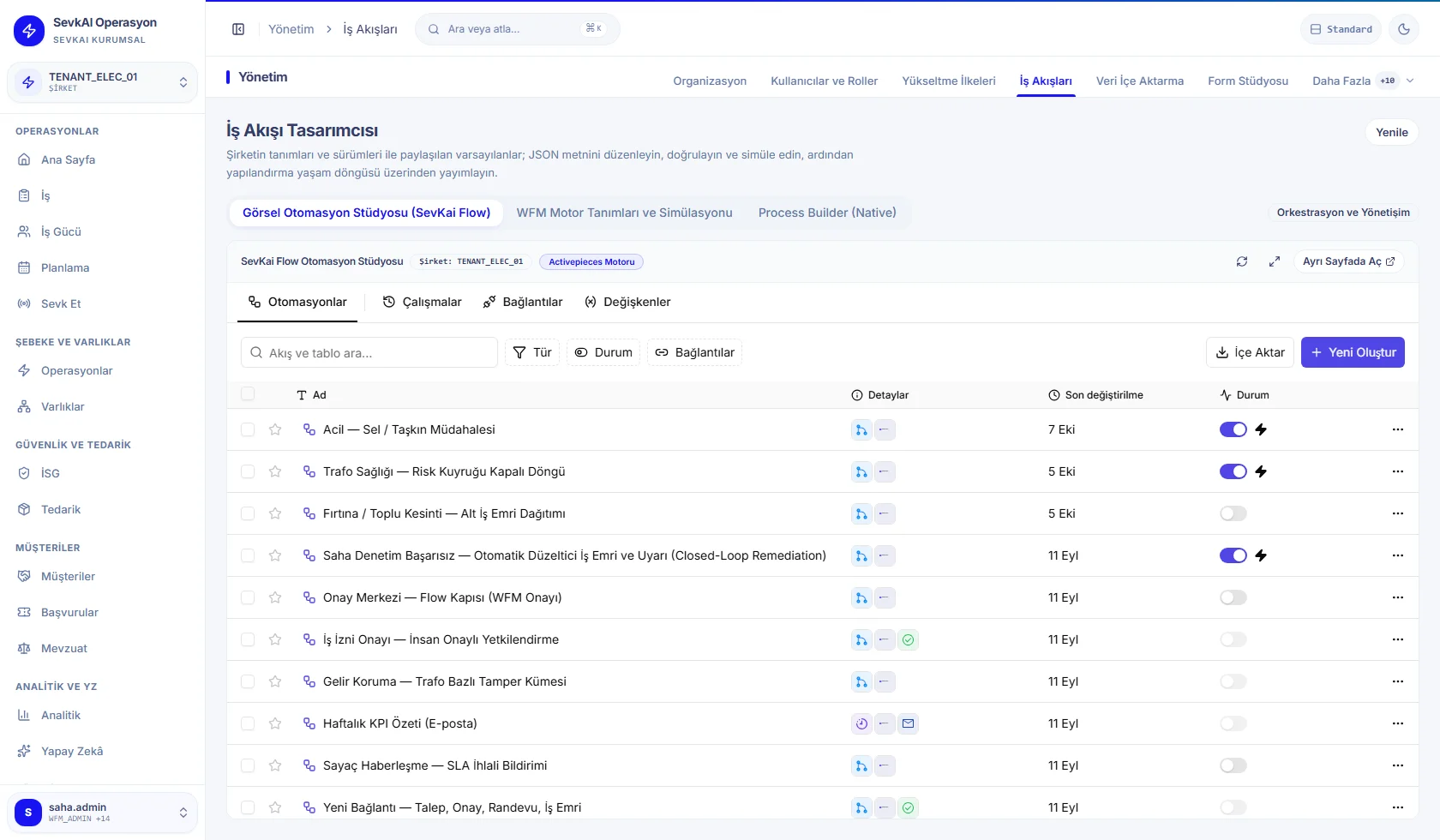
SevkAI Flow — Visual Automation Studio
Automation specialists · operations managers
- Enterprise workflows on a visual canvas without writing code; opens with the corporate sign-on, no separate password.
- Triggers: SCADA alarms, a drop in a transformer health score, storm report clusters.
- Ready-made templates: transformer health risk queue, storm / mass outage sub-work-order distribution.
- SAP and field work orders are created automatically as the outcome of a flow.
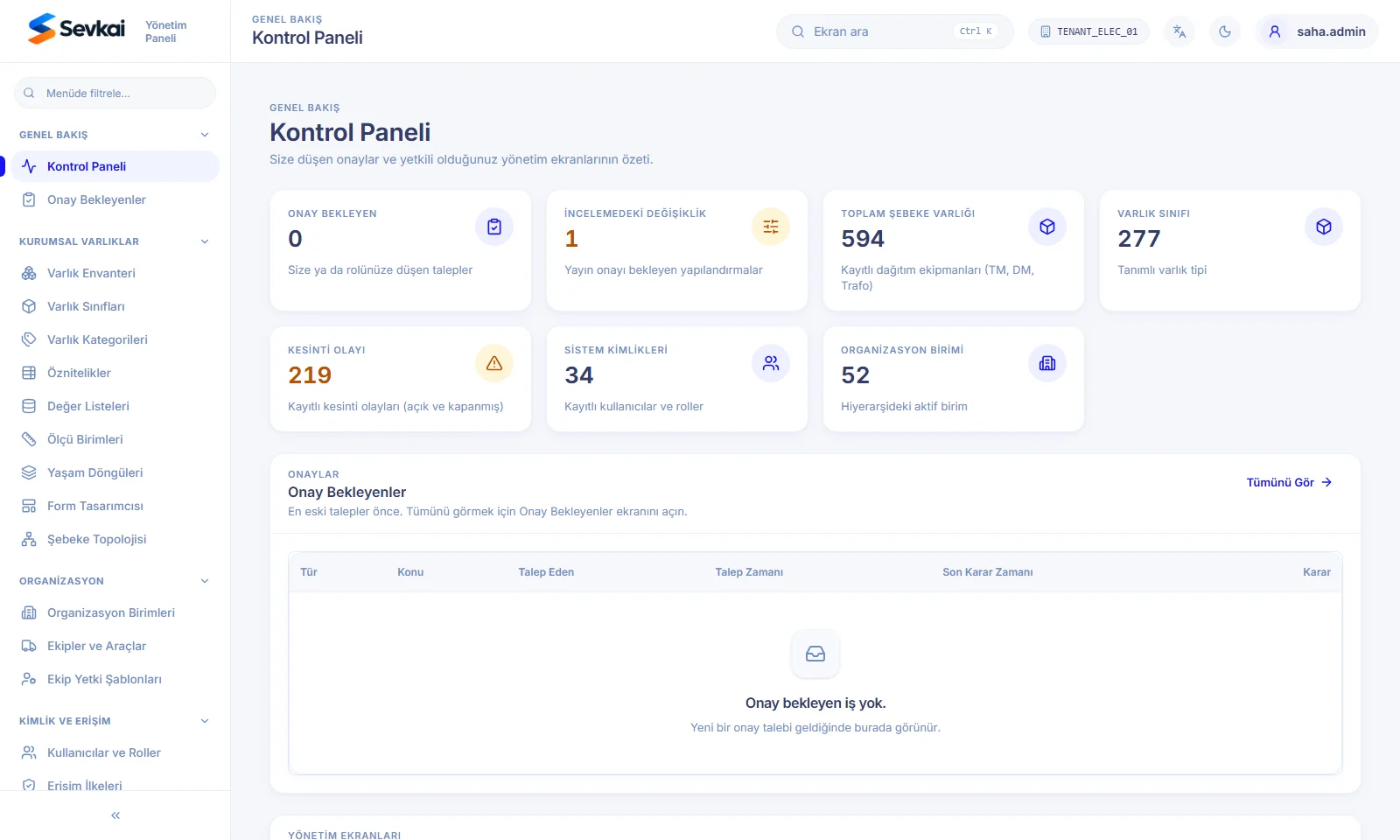
Management Console
System administrators · SAP/GIS integration specialists · auditors
- Multi-company structure: each distribution company's data is separated at database level.
- Enterprise asset registry: substations, distribution transformers, feeders and breakers with their SAP functional location and equipment codes (asset management).
- Work order types, mandatory field steps, photo/seal/optical reading rules and standard reason codes.
- Integration health, error queue and immutable audit records.
Every transformer, breaker and pole has a single identity
The network assets that work orders refer to are managed inside SevkAI. Inventory, class catalogue, life cycle and topology live on the same platform. Each asset is matched to its SAP functional location, GIS feature and SCADA tag.
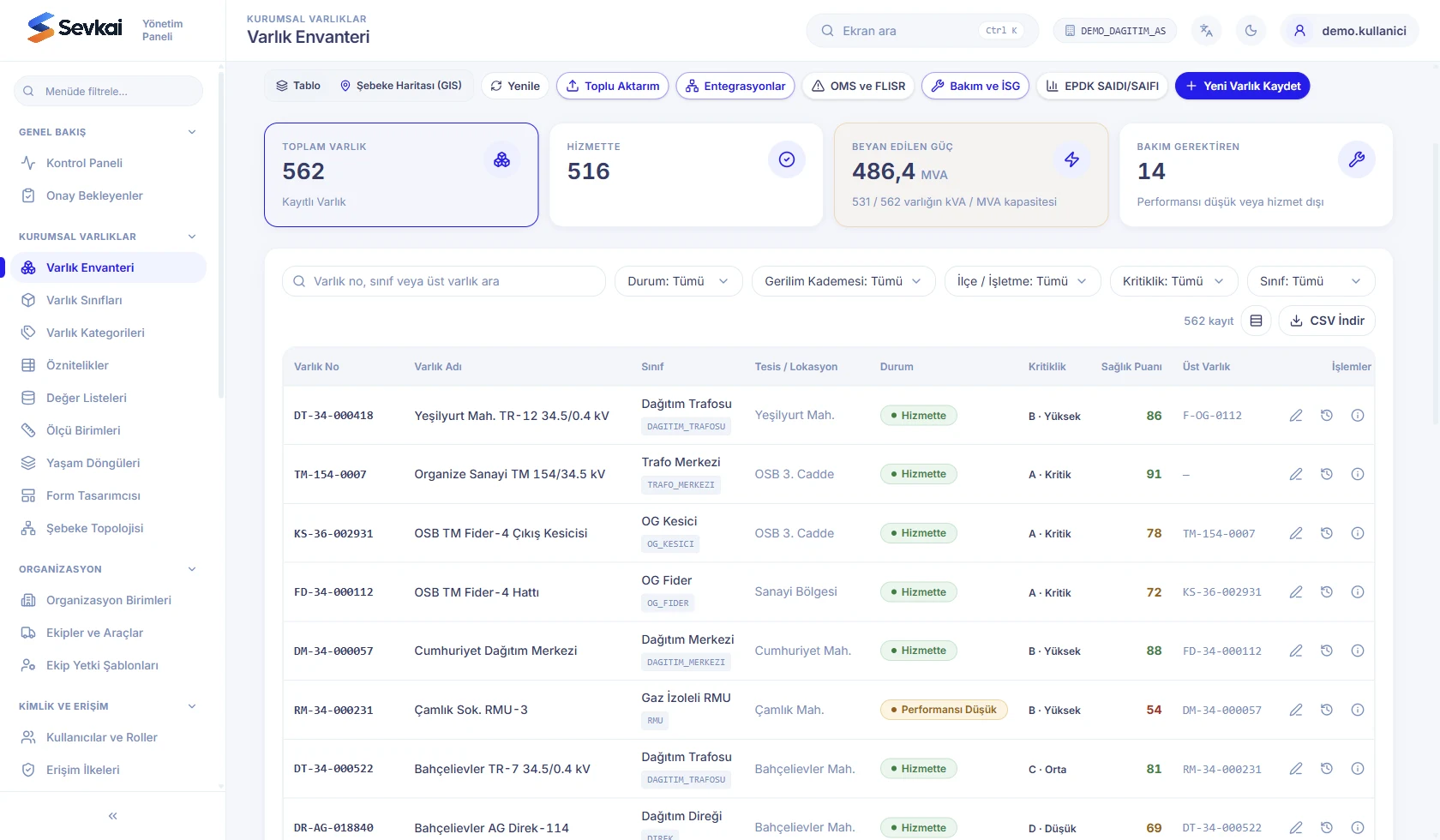
Asset inventory
Each asset's operating status, A–D criticality class, health score and parent asset are visible. The list can be filtered by voltage level, district/operating unit and class; opened as a table or a map; and downloaded as CSV.
Life cycle
An asset passes through 14 stages from planning to disposal, such as design, procurement, installation, commissioning, in service, monitored, degraded and under repair. Each transition is recorded in the status history with its reason and the user who made it. The state machine follows the ISO 55001 and IEC 61968 (CIM) approach.
Configurable catalogue
Assets are defined by category, class and attributes. The class wizard has identity, attribute and publishing steps. Point, line and polygon geometries are supported; organisation-specific classes and nameplate fields can be added.
Engineering vocabulary
Selection fields come from coded value lists: transformer cooling type, insulation medium, conductor type, EMRA maintenance category and more. Units of measure (kV, MVA, kVAr, ppm, μΩ) are defined with conversion factors to the base unit.
Network topology
Connectivity and isolation traces can be run upstream or downstream from an asset, and the topology can be validated. Planning changes are prepared in a separate branch version, reconciled and merged into the default version.
Matching with SAP and GIS
Assets are pulled from SAP or bulk-imported via CSV/JSON. GIS changes are synchronised in both directions. During import, records missing coordinates, feeders or SAP mappings are reported.
Asset performance and reliability
Risk matrix (APM)
A 5×5 risk heat map from probability and consequence of failure (ISO 55000). CIGRE health index, remaining useful life and data quality checks. Predictive alerts such as SF6 pressure loss, overheating and rising DGA hydrogen turn into proposed work orders that require approval.
Failure analysis (FMEA)
ISO 14224 failure taxonomy, Pareto distribution of root causes and failure modes, and assets with recurring failures. MTBF, MTTR and fleet availability are calculated.
Device laboratory
Calibration records for meters and current/voltage transformers (EN 50470, IEC 61869), tracking of security vulnerabilities in smart device firmware, and AQL acceptance inspection for supplier batches.
Investment planning
1–5 year investment budgets and budget-cap simulation. Replacement candidates are ranked by the ratio of annual risk cost to replacement cost and bundled into investment projects; construction projects are tracked.
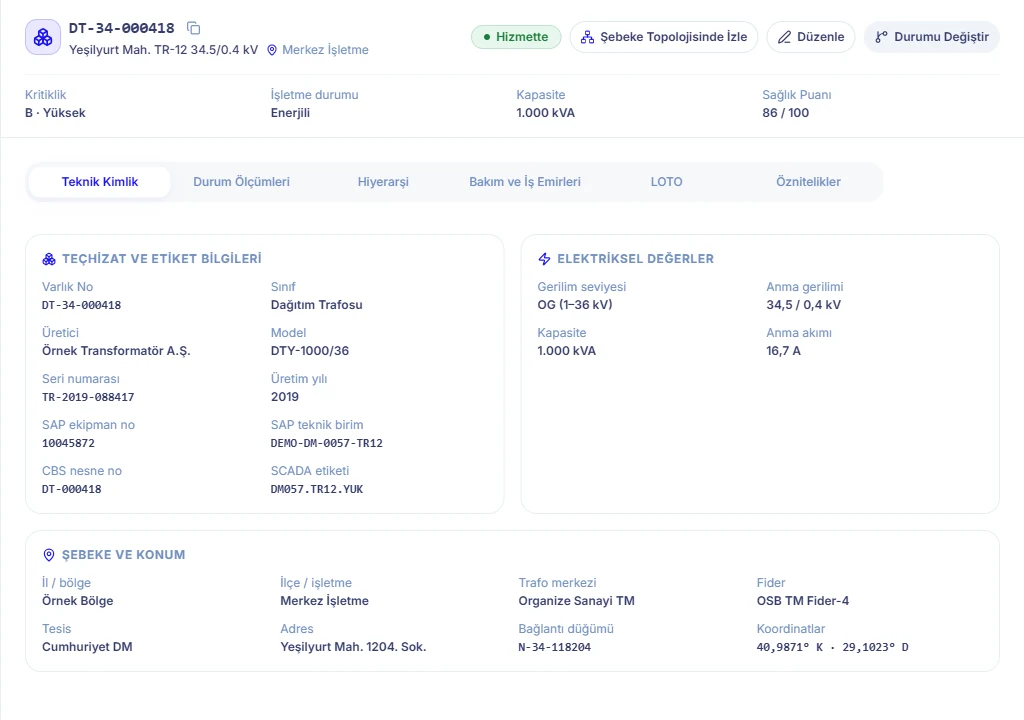
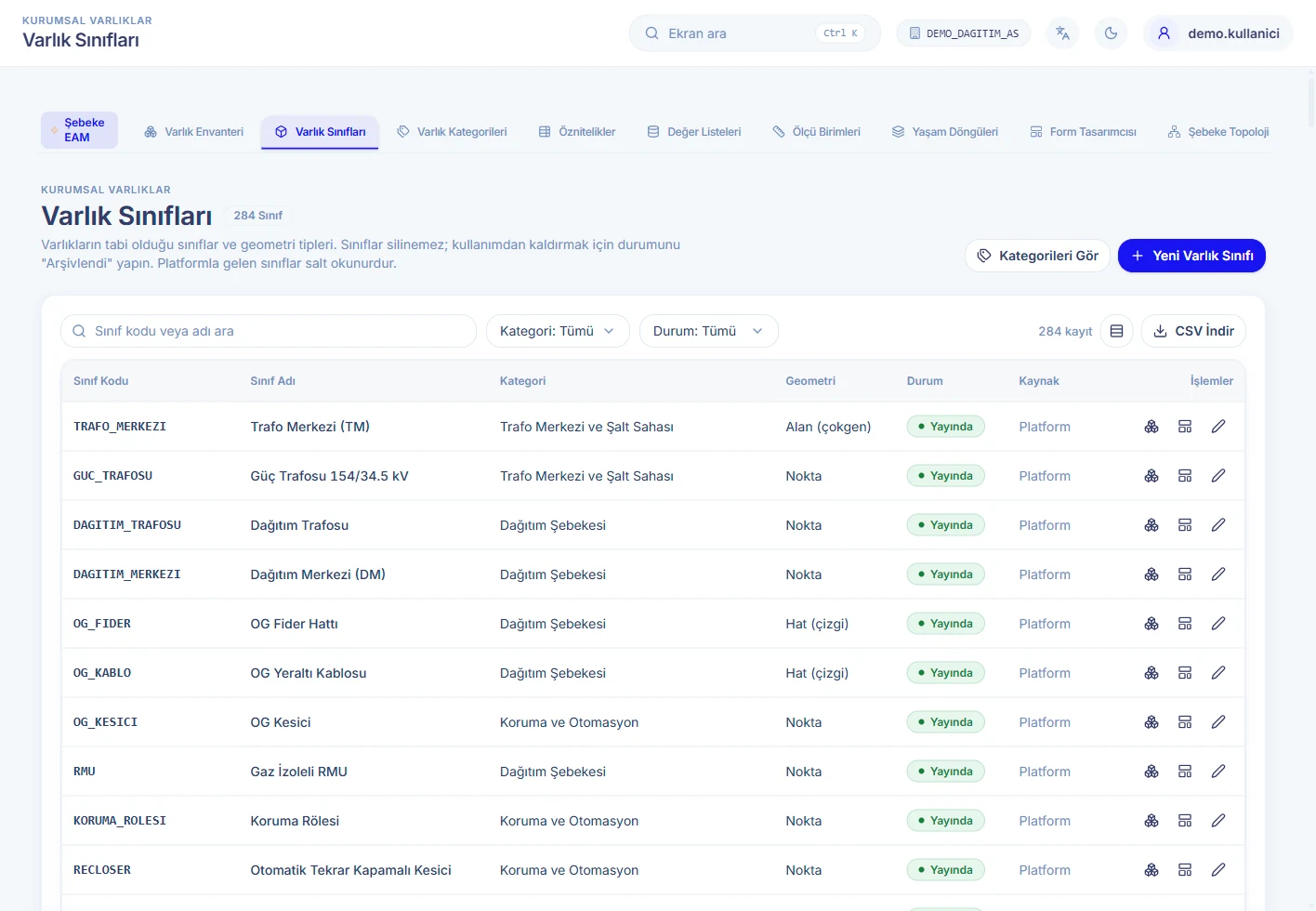
The data in the screenshots is representative. The user interface shown is in Turkish.
Work goes on even when the connection drops
The field app runs on Android and iOS. It carries out fault, maintenance and meter work orders, reads meters with a BLE optical probe and records seals and materials by barcode.
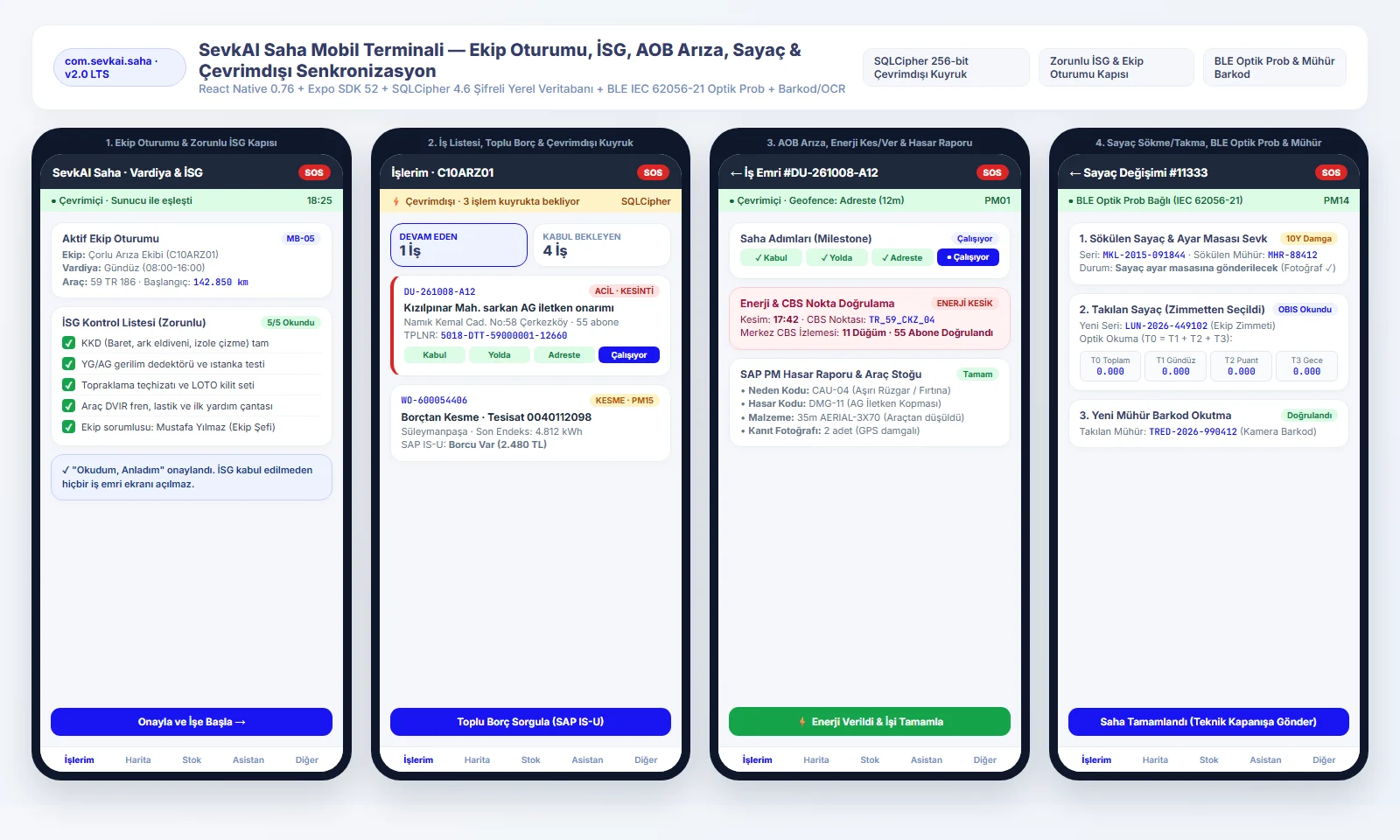
Mandatory OHS gate
No job screen opens until the crew session is started and the OHS checklist is confirmed.
Offline queue
Without a connection, all steps are stored on the device in a 256-bit encrypted database and transferred in order when the connection returns.
Evidenced steps
Accepted, en route, on site (GPS geofence), power off/on; photo and GIS point verification.
Meters and seals
Index reading with an IEC 62056-21 optical probe, use only of seals and meters assigned to the crew, and an emergency SOS.
Beyond the dispatch desk: from customer to contractor
Behind the desks, further modules complete the daily work of a distribution company. They all use the same work order, crew and asset records.
Requests and customers
- Requests from every channel in one inbox, with a drag-and-drop board and a map view.
- Fault reports, complaints, requests, information requests, objections, theft reports, damage claims and personal data (KVKK) requests; SLA status and hazard flags.
- Customer 360: service points, requests, communication preferences and satisfaction; planned outage notifications.
Regulation and EMRA reporting
- EMRA Table 7-A / 7-B records for each request, exports and complaint reports.
- Annual audit package, compensation tracking and call centre indicators.
- Transfers for requests coming from CİMER (the presidential communication centre) and EMRA; regulatory rules managed as a separate package.
Workforce and shifts
- Crews, directory, availability, shift patterns, working constraints and calendars.
- 24-hour shift Gantt chart: active work, travel, breaks and waiting; overtime compliance.
- Certificate validity tracking, crew permission templates, documents and expense approvals.
Planning and route optimisation
- Route solver with optimisation profiles: suggests a stop sequence for the crew, while the final decision stays with the dispatcher.
- Work zones, capacity and quota definitions; import of planned outages.
- Job templates, preventive maintenance, work request bundling; backlog grouped into 0–7, 8–30, 31–90 and 90+ days with SLA breach risk.
Occupational health and safety
- LOTO, hot work, confined space and work-at-height permits; a job cannot move to execution without a permit.
- Isolation records, risk assessments and OHS briefings.
- Required PPE list by job type and hazard; restricted and hazardous work zones on the map.
Supply, custody and contractors
- Vehicle stock and reorder thresholds, materials, purchase requisitions and material returns.
- Custody desk: meters, modems, current/voltage transformers and seals held by crews, individuals and warehouses, by serial number.
- Contractor scorecards and qualifications, service logistics.
Major events and network operations
- Storm mode: forecast, active, recovery and closure phases; repair jobs are opened first for critical customers, then by number of affected customers; support crews are deployed.
- Demand response: peak detection from feeder telemetry; customers are informed and actions run with operator approval.
- ISA-95 UNS telemetry streams, AMI/MDM meter operations (DLMS/COSEM, remote connect/disconnect), Duval triangle DGA diagnosis (IEC 60599), crew chat and announcements.
Analytics and reporting
- IEEE 1366 SAIDI, SAIFI, CAIDI and MAIFI; major event days separated with the 2.5 beta method, with the calculation basis shown on screen.
- Field service KPIs, SLA ledger, energy losses and an EMRA reporting studio.
- CSV exports prepared in the background; personal data columns are masked and every download is written to the audit log.
Platform configuration
- Workflow engine, rule set designer with dry runs and test cases, escalation policies.
- Form studio (versioning, live-work/LOTO checks), mobile app configuration, feature flags.
- Configuration changes from draft to publication, rollback and cross-company configuration packages; role-based workspaces.
- Developer portal: API keys with defined scopes and rate limits, a test console, webhooks, CIM schemas and usage metering.
Scenario lab and drills
- Run scenarios from the outage console: feeder breaker trip, automatic FLISR, smart meter last-gasp wave, Buchholz/DGA alarm, 186 call storm, full storm drill.
- Breaker and disconnector control strip; control is blocked at points with a LOTO lock. A crisis room for each outage.
- SAP PM, GIS and CRM simulators with fault injection: a pilot can be tested end to end without touching production systems.
Command map
- Crews, work orders, outages (with a halo of customers without power), network assets and feeders on one map with a live feed.
- Outage density and out-of-EN 50160 voltage heat maps; GIS layers for critical facilities, transformers, breakers and luminaires.
- Restricted work zones, warnings for telemetry older than 15 minutes; links to the single-line diagram and the outage console.
SAP master data and work order types
- SAP table exports (CSV or SAP XML) are loaded after a dry run: functional locations, equipment, work centres, storage locations and vehicle plates.
- SAP PM catalogues: cause, damage, object part and activity code groups, catalogue profiles.
- Work order type designer: linked workflow, step forms, SAP order/notification type mapping and automatic sub-work-orders; the outbound command chain is managed with retries or justified skips.
AI suggests, the operator decides
AI in SevkAI acts as an adviser. Its suggestions and answers are recorded, and no action is taken without operator approval. Depending on the organisation's preference, models can be used from an external service or run on-premises if the infrastructure is provided.
- Dispatch suggestions: crew suggestions from the live event stream that consider network and crew relationships together; each awaits the dispatcher's explicit approval.
- Predictive alerts: asset alerts that cross thresholds become proposed work orders; a work order is only opened with human approval.
- Operations assistant: questions and answers about work orders, assets, outages and work permits; answers cite the records they are based on. A separate assistant for field technicians.
- OCR meter reading: index drafts read on the device come in for approval; digit accuracy and rejection rates are monitored.
- Probable outage detection: likely outages inferred from requests and signals appear on a separate map layer.
AI governance
- An L0–L3 autonomy policy matrix per agent. Dispatch, process publication, de-energisation and work permits are never executed automatically at any level.
- Emergency stop at company level or for a single agent.
- Decision ledger: each suggestion is recorded as proposed, approved, rejected, executed or overridden.
- Knowledge base: the regulations, procedures and manuals behind the suggestions are indexed, and you can test which passages a search retrieves.
- Admin drafter: drafts processes, rules and forms from a described need; publication requires human approval.
Built on top of your existing systems, not in place of them
SevkAI brings the organisation's core systems together in one operational flow without replacing them. When SAP is unreachable, commands are not lost; they are delivered with ordered sending, retries and a record chain.
Designed for critical infrastructure
On-premises deployment
The platform is installed on the organisation's own servers. If the organisation prefers and provides the infrastructure, AI models run on-premises too, so data does not leave the organisation.
Permissions and data separation
Role- and attribute-based authorisation; row-level security at database level for each company.
Immutable audit log
User actions, status transitions and integration calls are recorded in line with the Turkish Personal Data Protection Law No. 6698 (KVKK).
EMRA compliance
24-hour urban / 48-hour rural SLAs, 48-hour outage notices, EYDF maintenance forms and SAIDI/SAIFI indices.
Occupational safety
Two-stage LOTO approval, a mandatory OHS checklist and a one-touch emergency SOS from the field.
Local R&D
Developed by Fizibil with TREDAŞ under EMRA's local software R&D project call; the source code and integration know-how stay in Türkiye.
SevkAI at a glance
| Components | Operations Portal, Fault Repair, Meter and Planning desks, Network GIS, Digital Twin, SevkAI Flow, Management Console and Field Mobile Terminal (9 modules) |
|---|---|
| Platform | Web-based desks; Android and iOS field app |
| Deployment | On the organisation's own servers. AI models are used from an external service or, if the infrastructure is provided, run on-premises, as the organisation prefers. |
| SAP integration | Two-way with PM, IS-U, MM/WM, FI-CA and HR; daily automatic synchronisation of 26 master data tables; no lost commands thanks to ordered sending and retries |
| Other integrations | Esri Utility Network (SAP GEF matching), AMR (OSOS), SCADA / OMS, CRM / 186 call line; SAP PM, GIS and CRM simulators for pilots |
| API | API keys with defined scopes and rate limits, webhooks, CIM schemas, test console |
| Identity and access | Single sign-on (SSO), Active Directory / LDAP; role- and attribute-based authorisation, row-level data security per company |
| Field app | Offline operation, 256-bit encrypted local queue; step verification by GPS geofence and photo; meter reading with an IEC 62056-21 BLE optical probe; seals and materials by barcode |
| Network analysis | 8-mode topology tracing (downstream, upstream, fault isolation, ring, impedance path, phase balance); single-line diagram |
| Asset management | Inventory, class/attribute catalogue, ISO 55001-based life cycle; 5×5 APM risk matrix, FMEA (ISO 14224), device calibration, investment planning |
| Customers and regulation | Multi-channel request management, Customer 360, EMRA Table 7-A / 7-B records, complaint reports, annual audit package, compensation tracking |
| Regulation | EMRA 24-hour urban / 48-hour rural SLAs, 48-hour outage notices, EYDF maintenance forms; IEEE 1366 SAIDI, SAIFI, CAIDI, MAIFI |
| AI | Advisory only: dispatch suggestions, an operations assistant that cites sources, OCR meter reading; L0–L3 autonomy matrix, emergency stop, decision ledger |
| Planning | Route optimisation, work zones, capacity and quotas; 24-hour shift Gantt chart |
| Audit and safety | Immutable audit log (in line with KVKK, Law No. 6698); two-stage LOTO approval, mandatory OHS checklist, emergency SOS |
See SevkAI on your own network
Let us show you the operations desks, the field app and the digital twin in a live demo, and work out an integration roadmap together based on your SAP and GIS landscape.
- Live demo: an end-to-end fault scenario from the dispatch desk to the field app.
- Integration assessment: the access needed for SAP, GIS, AMR (OSOS) and SCADA connections.
- Beta rollout plan: on-premises installation and a pilot with real data.
To review before the meeting: SevkAI product catalogue (PDF, 2.7 MB) · Türkçe